Skip to content

Play Car Town online: buy, paint and race cars from your own garage

Car Town is a car and garage game: you buy cars, customize them, put them to work and race your neighbors in friendly reflex races. This edition runs in your browser at cartown.fbgamesweb.com, with no Flash and nothing to install, using a free account of your own. It is in beta, so parts of the original game are missing and you may run into bugs. The game itself comes in English and Spanish.

In beta: some parts of the original game are missing and you may run into bugs.

  • Free
  • No Flash, nothing to install
  • Your own account, progress saved
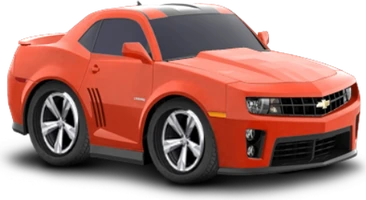
A sports car, a wheel rim and a suspension spring from Car Town, drawings from the game itself

What is Car Town?

Car Town is a car and garage game that started out on Facebook, made by Cie Games. You buy cars, customize them, put them to work in your own garage, race your neighbors and level up to unlock more cars, parts and decorations. The look is pure early-2010s Facebook: bright colors and cartoon drawings, with chubby cars seen from an isometric angle.

On Facebook you needed your profile to play. Here you don't need Facebook at all: you play in the browser with an account of your own, and progress from the Facebook game is not imported. Everyone starts fresh after signing up.

How do you play Car Town?

The game revolves around your garage. You see your lot next to a street with an intersection, road signs, other people's cars and your work station, which is a lift. Customers drive up and line up in front of the garage: click one to see what they need, start the job at your station, then come back when it is done to collect your pay.

The top left shows your level and, under it, the garage value bar, next to your coins and your credits (blue points). The bar along the bottom gives you My Garage, Edit Garage, Buy Cars and Glove Box. Click any car you own to open its panel: Customize, Picture, Sell and four activities, Friendly Racing, Road Trip, Car Show and Deliver Pizza.

Buying a car, painting it and winning a race all give experience, and every new level opens more of the shop. New accounts also get a tutorial with a neighbor called Rusty, who walks you through your first job.

Which cars can you buy and how do you customize them?

Buy Cars is the car shop. You can sort it by newest, model name, manufacturer name, price or the level that unlocks each car, or search by name. Click a car and it appears in a showroom with its name and year, its class (a single letter), a performance score, color swatches, the experience you gain from buying it and the price. More than 350 cars are on sale, in five classes.

Customize opens the editor, with tabs for Paint & Graphics, Wheels, Tires, Body, Performance, Suspension, Window Tint and Lights. Paint accepts any color: a palette with a brightness slider, R, G and B fields and a hex code. The car changes color as you pick, and you confirm the purchase with coins.

There are more than 2,000 parts on sale, enough to make two cars of the same model look very different.

How do friendly races work?

Friendly Racing is a reflex minigame, not a driving simulator. Click Start and the lights come on: wait on yellow and press the green button the moment it turns green. The sooner you press after green, the more points you get off the line, and leaving early counts as a foul.

Then come three gear changes. Click to shift as close as you can to the green line on the rev counter without going past it: landing on the line earns a bonus, while overshooting can push your score below zero. The highest positive score wins, and beating a neighbor pays coins and experience, with a daily limit for each player.

A Practice button lets you train with no rival at all, and friendly races need no fuel.

Neighbors, garage and decoration

Edit Garage is the shop where you decorate your lot. Its tabs cover work bays (lifts), storage, functional items, miscellaneous objects, chairs and tables, floors, walls, doors, windows, signs and lot expansions, with more than 500 objects in all. Each one costs coins or credits, and Reset Floor restores the floor.

You can expand the lot 11 times, from 10 x 10 all the way to 40 x 40. Your garage value rises with the value of your cars and objects, climbing through ten titles from Flimsy to Exalted.

Add Friends opens the Neighbors panel, with tabs for Neighbors, Requests, Search, Invite, Gifts and Photos. Two neighbors, Rusty and Axel, come with the game. Requests, gifts and visits have been checked with automated tests but not yet with two real players, so treat the social side as new.

Car Town without Flash: account, languages, browser and phone

Car Town runs in the browser at cartown.fbgamesweb.com, with no Flash, no download and no installer. Creating an account is free: a username of 3 to 24 characters, a password of 8 or more and, if you want, an email. Your progress is saved on the server and tied to your account.

The game comes in English and Spanish only: there is no Portuguese, French, German, Russian or Chinese interface, even if you are reading this page in another language. We tested it on Chrome on a computer and have not tried phones.

It is a beta. The high-stakes racing track is closed, a few placeholder windows are still empty, and some cars in the catalog have incomplete artwork. If something breaks, open a support ticket.

How to get started in 3 steps

  1. Create your account

    Go to cartown.fbgamesweb.com and sign up with a username, a password and, if you like, an email. Then close the welcome windows and collect your Daily Bonus.

  2. Do your first job and paint a car

    Follow the tutorial with your neighbor Rusty: start a job at your station, collect your pay, then open Customize on a car and paint it any color you like.

  3. Run your first friendly race

    Click a car, pick Friendly Racing and start with Practice. Wait on yellow, go on green and shift close to the green line, then challenge a neighbor with GO!

Frequently asked questions about Car Town

Is Car Town a Facebook game? Do I need Facebook to play?

Car Town started out as a Facebook game made by Cie Games, but you don't need Facebook to play this edition. You create an account of your own on cartown.fbgamesweb.com with a username and a password, and you play right in the browser. There is no Facebook login, and progress from the Facebook game is not imported.

Is Car Town free?

Yes. Creating an account and playing Car Town on this site is free. There is nothing to download or install: you only need a browser and an account of your own. You start with some welcome coins and credits, and you earn more by working in your garage and winning races. The game is still in beta.

Can you play Car Town without Flash?

Yes. This edition of Car Town runs in the browser with no Flash, no plugins and no installer. You open cartown.fbgamesweb.com, log in with your account and play. We tested it on Chrome on a computer, so that is the safest choice if you want to avoid surprises.

Which languages is Car Town available in?

The game itself comes in English and Spanish. The menus read Buy Cars, Edit Garage and Glove Box in English, and Comprar autos, Editar garaje and Guantera in Spanish. There is no interface in Portuguese, French, German, Russian or Chinese, so Car Town is not available in those languages.

Does Car Town work on a phone?

We don't know yet. Car Town has a stage of a fixed size designed for a computer screen, and it has not been tested on phones, so we can't promise it works on one. We recommend a computer with a mouse, and Chrome is the browser we tested. If you try it on a phone, open a support ticket and tell us how it went.

Is this the official Car Town site?

No. Car Town is an original game by Cie Games. This is an independent browser edition based on the original game and run by FB Games, and it is not affiliated with or endorsed by Cie Games, Facebook or Meta. If you were looking for a Car Town private server, this edition runs on its own independent server, is free and is in beta.

What is missing or can fail in the Car Town beta?

Car Town is a beta, so parts of the original game are missing and bugs can show up. The high-stakes racing track is closed, some windows are placeholders (one GPS tab is empty and one Glove Box icon is greyed out), and some cars in the catalog have incomplete artwork. If something breaks, open a support ticket.

How do I start playing Car Town?

Sign up at cartown.fbgamesweb.com with a username, a password and an optional email. Close the welcome windows, then follow the tutorial with your neighbor Rusty: do your first job at your station, collect your pay and paint a car. After that, try Friendly Racing with Practice and keep going through the missions.

Can I play Car Town with friends?

Yes, through neighbors. Add Friends opens a panel where you can search for a player by name, send and accept requests and invite people with a link, and there are tabs for gifts and photos too. These features have been checked with automated tests but not yet with two real players, so expect some rough edges.

Can you change the color of your car in Car Town?

Yes, to any color. In the Customize editor, open Paint & Graphics and choose a shade on the palette, adjust the brightness, or type the R, G and B values or a hex code. The car changes as you choose, and you confirm the purchase with coins. Painting a car also earns experience.

How are the races in Car Town?

Friendly races are a reflex test. In Car Town you wait on yellow, press the green button as soon as it turns green, then click three times to shift gears as close as possible to the green line without passing it. The highest positive score wins. Practice lets you train without a rival, and races need no fuel.

Is my Car Town progress saved?

Yes. Your money, your painted cars and your level are saved on the server, tied to your own Car Town account, and they were still there after we reloaded the game twice in the same browser. Progress from the Facebook version of Car Town is not imported, so every account starts fresh.

Brand notice: Car Town is an original game by Cie Games. Facebook is a trademark of Meta Platforms, Inc. FB Games is an independent project and is not affiliated with or endorsed by Cie Games, Facebook or Meta. This is a browser edition. Chrome and Flash are trademarks of their respective owners.