Skip to content

Nightclub City without Flash: how to play it in your browser and what to do if it won't load

You can play Nightclub City without Flash. This edition opens directly in your browser, with no plugin, no installer and no app: you create a free account and press Play now. Adobe ended support for Flash Player on December 31, 2020, which is why so many old browser games stopped working. This page explains what you need today, what the first visit downloads, what to do when the game shows a connection problem and what to try when it does not load.

  • Free
  • No Flash, nothing to install
  • Your own account, progress saved
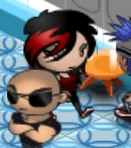
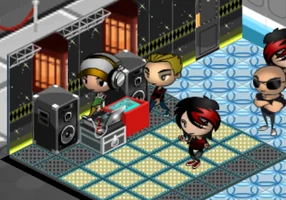
A nightclub from Nightclub City with its DJ booth and dance floor, captured from the game itself

Play Nightclub City without Flash

Here is the game: open it in your browser, create a free account and start. You do not need Flash, a plugin or any download.

A nightclub from Nightclub City with its DJ booth and dance floor, captured from the game itself
In beta

Nightclub City

Book the DJ and the music, throw parties for your guests, stock the bar and grow your club in this classic Facebook nightclub game.

In beta: some parts of the original game are not complete yet and you may run into bugs.

NightclubManagementParties

Why did old browser games like Nightclub City stop working?

Browser games from the Facebook era commonly relied on Flash Player, and Adobe stopped supporting Flash Player on December 31, 2020. Adobe recommends uninstalling it.

In the case of Nightclub City there is an earlier reason too: the Facebook version closed in 2014, years before Flash was retired. This edition brings the game back, and it does so without depending on Flash at all.

How does Nightclub City run without Flash here?

It simply runs in the browser. There are no plugins, nothing to install and no app to download: open nightclubcity.fbgamesweb.com, sign in with your account and play. Your progress stays with your account, so another browser can pick up the same club.

Do not install Flash Player to try to make it work. You do not need it, and a page that asks you to install a Flash update for Nightclub City is not legitimate.

What do you need to play Nightclub City today?

A computer with a mouse, an up-to-date browser and an internet connection. The game is in English and is played with the mouse.

In our testing, the game has been checked mainly with Chrome. Safari and Firefox have not been checked thoroughly, so if something goes wrong there, try Chrome and tell us through a ticket. A phone or tablet will open the page, but that part is still experimental; the mobile guide covers what to expect.

What does the first visit download?

The first visit is the heaviest one: your browser downloads the game's code, images, fonts and audio from nightclubcity.fbgamesweb.com. We do not promise a number of seconds, because that depends on your connection and your device.

After that your browser keeps many of those files in its cache, so later visits do not download everything again. When the game is updated, the new files are requested by themselves.

What happens if a file does not load, and what is the connection notice?

While the game starts it downloads its files and retries on its own if one fails. If a file still does not arrive after several tries, or if the game has not started after 75 seconds, a notice appears with the title Connection problem and a Retry button. If your browser is set to Spanish, the notice appears in Spanish.

The notice means that one of the game's own files did not arrive, which most often points to your connection. The Retry button tries again, and it is the first thing to press.

What can you try if Nightclub City does not load?

Start simple. Press Retry, or do a hard reload with Ctrl+Shift+R (Cmd+Shift+R on a Mac), which asks the browser for fresh copies of the files. Then check your connection.

If it still fails, try another browser, preferably Chrome. If the problem continues, sign in on the website and open a ticket from Support, at nightclubcity.fbgamesweb.com/support, saying which browser you use and what the screen shows. The website and the game are separate, so you can open a ticket even when the game does not start.

Is your club safe if the page fails, and what about the sound?

Your progress is saved on the server, tied to your account, so changing browser or reloading the page does not start a new club. Sign in again and you continue where you left off.

The game has music and sound effects: 31 songs and its own effects. If you hear nothing, open Settings in the game, where the sound and music options are, and check that the tab and your device are not muted.

How it works

Three steps and you're in.

  1. Pick a game

    From this home page. Each game opens at its own address, with its own start screen.

  2. Create your account

    A quick sign-up inside the game. Your progress is saved on the server, not in your browser.

  3. Play wherever you like

    You play in your browser, with no Flash and no downloads, on a computer and, depending on the game, on your phone too.

Frequently asked questions about Nightclub City without Flash

Can you play Nightclub City without Flash?

Yes. This edition of Nightclub City opens directly in your browser, with no Flash, no plugin and no installer. You create a free account at nightclubcity.fbgamesweb.com, press Play now and wait for the first load to finish; after that your browser keeps the files for next time.

Do I need to install Flash Player for Nightclub City?

No. Nightclub City here does not use Flash at all. Adobe recommends uninstalling Flash Player, so do not install it, and be wary of any page that says Nightclub City needs a Flash update. A real session needs only your browser and an account of your own.

Why did Flash games stop working?

Adobe stopped supporting Flash Player on December 31, 2020, and recommends uninstalling it. That is why older Flash games, Nightclub City among them, cannot be opened the old way. The Facebook version of Nightclub City had also closed years earlier, in 2014.

Which browser should I use for Nightclub City?

Use Chrome on a computer, which is what the game has been checked with the most. Firefox and Safari have not been checked thoroughly, so they may or may not work. If another browser fails, switch to Chrome before anything else.

Does Nightclub City download anything to my computer?

There is no installer or program. All that happens is that your browser downloads the game's files, such as the code, images, fonts and audio, and keeps many of them in its cache. To remove them you can clear the browser cache; your club is not deleted.

Does Nightclub City load faster the second time?

Generally, yes. After the first visit your browser keeps many files in its cache, so they do not all have to travel again. We do not promise a time in seconds, which depends on your connection and your device.

What does the Connection problem message in Nightclub City mean?

That one of the game's files did not arrive after several automatic tries, or that the game had not started after 75 seconds. Press Retry to try again; if it fails again, try a hard reload with Ctrl+Shift+R and check your connection.

Will I lose my club if the game does not load?

No. Your progress is saved on the server, tied to your account, and not only in the browser. If the game does not load, your club is still there; once you manage to open it, sign in and continue where you left off.

What do I do if Nightclub City is stuck on the loading screen?

Wait a little and press Retry if the notice appears. If not, do a hard reload with Ctrl+Shift+R, check your connection and try Chrome. If the problem continues, open a ticket from Support and tell us which browser you use and what the screen shows.

Does Nightclub City work in a phone browser without Flash?

It opens in a phone browser, since there is nothing to install, but it is designed for a computer and a mouse and that part is still experimental. On a phone the game is shown in portrait. Our mobile guide covers what to expect.

Does Nightclub City have sound, and how do I change it?

Yes: the game has 31 songs and sound effects of its own. The sound and music options are in Settings, inside the game. If you hear nothing, also check that the browser tab and your device are not muted.
Brand notice: Nightclub City is an original game by Booyah. Facebook is a trademark of Meta Platforms, Inc. FB Games is an independent project and is not affiliated with or endorsed by Booyah, Mobage, Facebook or Meta. This is a browser edition. Flash and Adobe are trademarks of Adobe Inc., and Chrome, Firefox and Safari are trademarks of their respective owners.

No Flash, no plugin, no download: open Nightclub City in your browser

Creating an account takes a minute, and you play straight from your browser.

Play Nightclub City