How do you create an account and start playing Nightclub City?
Open nightclubcity.fbgamesweb.com and choose Create a free account. Pick a username of 3 to 24 letters, numbers or underscores and a password of at least 8 characters. Creating an account is free, it asks for no email address, and you do not need Facebook or Flash.
Once you are signed in, the game opens at once. It is in English, and your progress is saved on the server, tied to your account, so you can sign in from any browser and continue where you left off. Nightclub City has its own accounts, which are not shared with the other FB Games.
What does the tutorial teach you?
The first time you play, a tutorial of a few short screens walks you through the basics. It starts with a welcome, a short introduction to running your club, and then moves to the music: click the record icon to choose what to spin and pick one of the playlists. You can change the playlist at any time.
Next you book a party by clicking the parties icon and choosing the one you want to throw. Then you stock the bar: the drink meter shows how much your bar has, and you restock it before the guests arrive. Last, you type the name of your club, the one your guests will see.
When the party ends, the success screen shows how it went and you collect your earnings and experience. If you want to see the tutorial again, open Settings in the game and press Replay for the tutorial.
How do you choose the music and the DJ's set list?
The game has 31 songs in six genres, and each genre is a playlist: Hip Hop with 7 songs, Dance with 5, Pop with 6, Techno with 5, R&B with 4 and Country with 4. Each playlist runs from about 15 to 26 minutes of music, and in this edition the original songs were replaced by other music.
The DJ has abilities of their own. New Set lets you choose your music and start a new set, Refresh Set updates your music selection and extends your set, Drop Bass earns big tips from your dancing guests, and Dedicate Song cheers up a guest by dedicating a song.
Playlist names and ability names appear in English, as in the game. You do not need to pick perfectly on the first night: you can change the playlist at any time.
How do you run a party and stock the bar?
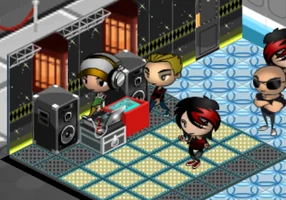
Booking a party starts from the parties icon. Once the party begins, your guests arrive and enjoy the night to the music the DJ is spinning, and you can click a guest to see what they are up to.
Keep the bar stocked so guests have something to drink. The drink meter shows how much the bar has, so restock it before the guests arrive. Your bartender has abilities too: Bar Trick attracts nearby guests to the bar and earns huge tips, and Bottoms Up instantly serves everyone waiting at the bar.
The bouncer keeps order: Remove Guest throws a guest out of your club, Move chooses a different area to watch for troublemakers, and VIP Hookup seats a guest at one of your booths. When the party is over you collect the money you earned and the experience that goes toward your next level.
How do levels, the shop and decorating work?
Experience raises your level, and each new level comes with rewards. The game data has 100 levels, from Radiophonic Rookie to Basselisk of Legend. Many pieces of furniture are tied to a level and unlock when you reach it.
With the money you earn you can open the shop, buy furniture and decorate your club in decorating mode. The shop lists 456 items in eight categories: Dance, DJ, Bar, Seating, Flooring, Wall Decor, Decor and Special. A bigger, better club brings in more guests.
Some items are paid for with NC Cash, the optional premium currency, and items locked by level can also be unlocked early with it; the price is always shown before you confirm.
What are the controls?
Everything is done with the mouse: you click icons, buttons, guests and furniture. Scroll the mouse wheel to zoom in and out of your club. Settings, in the game, has the sound and music options and the tutorial replay.
On a touch screen you pinch to zoom. Phones and tablets are supported, but that part is still experimental, and on a phone the game is shown in portrait. For the best experience we recommend a computer.
What comes after your first night?
Once your first club is running, the Empire of clubs lets you buy clubs in other cities on the map, hire a manager for each one, renovate it and sign celebrities. Every club keeps earning in the background, and when you return a summary shows what each one earned.
Seven club seasons open by themselves on real dates, from Halloween to summer, with goals, themed parties and limited-time furniture. You can also add friends by username, visit their clubs and send them gifts.
NC Cash, tickets and where to get help
NC Cash is the premium currency of the shop. It is not sold inside the game: it comes from voluntary donations. Donate with PayPal on fbgamesweb.com, take a screenshot of the payment from your PayPal account and open a ticket from Support with it. Your username goes with the ticket automatically, and delivery takes up to 24 hours.
Use Support for anything else too: bugs, questions about your account or players you want to report. Pick a category, say what happened in as much detail as you can and the team answers you inside the ticket. The game is in English and in beta, so if you find a bug, open a ticket.