Skip to content

Backyard Monsters with no Flash: how to play it in your browser today

Yes, you can play Backyard Monsters with no Flash. This edition opens directly in your browser, with no plugin, no extension and nothing to install, using a free account of your own. Below you will find what “no Flash” means, what you need, how long the first load can take, what to try if it stalls, how saving works and where this edition differs from the Facebook game.

  • Free
  • No Flash, nothing to install
  • Your own account, progress saved
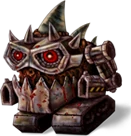
Three Backyard Monsters monsters, drawings taken from the game itself

Play Backyard Monsters with no Flash

Here is the game: open it in your browser, create a free account and start your yard. No Flash, no plugins and no download.

Three Backyard Monsters monsters, drawings taken from the game itself
In beta

Backyard Monsters

Build your yard with buildings and towers, raise monsters with Goo and send them against the wild tribes on the map in this classic Facebook game.

In beta: some parts of the original game are not complete yet and you may run into bugs.

StrategyMonstersBuilding

What does “no Flash” mean for Backyard Monsters?

The original Backyard Monsters was built on Flash, a technology that current browsers no longer run. This edition does not use it. The game loads inside the web page, so there is no Flash Player to install, no plugin, no extension and no installer.

That also settles a safety question. Because Flash does not run in browsers, any page that asks you to install or update a “Flash Player” in order to play Backyard Monsters is not helping you, so close it. The only address for this edition is backyardmonsters.fbgamesweb.com.

What do you need to play Backyard Monsters without Flash?

A computer with an up-to-date browser, an internet connection and a free account of your own. You do not need Facebook: sign-up asks for a username and a password, and the email is optional.

Here is what has been checked. Automated test runs, with no person at the keyboard, repeated the same route in Chrome, in Firefox and in a test browser built on the same base as Safari (not the Safari app itself): sign-up, the yard, the tutorial up to building the Sniper Tower, saving, and reloading to find the same state. They finished with zero errors. Nobody has played it by hand in Safari, Firefox or Edge yet, so if one of them misbehaves, tell us in a ticket.

How long does Backyard Monsters take to load?

The first visit is the slow one, because the browser has to fetch all of the game's files. In a lab test with Chrome, an empty cache and a new player, a simulated 9 Mbps connection showed the yard after roughly 5.6 seconds, and the first load came to about 11 MB. On a slow simulated connection of 2 Mbps with a long delay it took about 16.5 seconds. With the cache already full, the yard appeared in about 2.7 seconds.

These are lab figures on simulated networks and processors, not a promise. Once you are in, the game runs at its own pace of 24 frames per second. On a normal computer that held up in the yard and in combat. When the processor was slowed to a quarter of its normal speed, combat dipped to about 23 and stuttered, so an older or modest computer can feel less smooth.

What if Backyard Monsters stays on the loading screen?

On a first visit, give it a little time, then reload the page. If something breaks, the game shows Oops, something broke! with a Reload button, and if the loader itself does not arrive it shows a message with Retry. While you play, the account menu also offers an option to reload the game.

If you use an ad or content blocker, pause it for the game's page and reload. Update your browser and try a second one to rule out an extension. If it keeps failing, open a ticket from Support and tell us your browser and what you saw.

Is your progress saved in Backyard Monsters?

Yes. Your yard, resources and monsters are saved on the server with your account, not in your browser. You can carry on from another browser or another computer by logging in with the same username. The game saves by itself every few seconds, and the last seconds before you close the tab can be lost.

If your session ends, the game says so and asks you to sign in again; your yard is saved. From your account you can look at your active sessions, sign out of all of them and change your password.

How is Backyard Monsters here different from the Facebook game?

There is no Facebook involved and no progress import: you get a fresh account and a fresh yard. The rules are this edition's own. You attack wild tribes, and other players on the map are protected. The Inferno, outposts, alliances, mail, gifts and chat are not available.

The art comes from the original game by Kixeye, with gaps. Part of the quest, event and window art is replaced by neutral placeholders, so do not expect every screen to look identical to the Facebook version.

What are the limits of this Backyard Monsters beta?

It is a beta: some parts of the original game are not complete yet and you may run into bugs. The tests so far cover the sign-up, tutorial and save route, plus raising and launching Pokeys. The other monsters have their figures in the game but have not been tried one by one, and phones and tablets have not been tested on real devices.

If you hit a problem, use Report a problem in the account menu or open a ticket from Support. Telling us the browser and what happened helps the most.

How it works

Three steps and you're in.

  1. Pick a game

    From this home page. Each game opens at its own address, with its own start screen.

  2. Create your account

    A quick sign-up inside the game. Your progress is saved on the server, not in your browser.

  3. Play wherever you like

    You play in your browser, with no Flash and no downloads, on a computer and, depending on the game, on your phone too.

Frequently asked questions about Backyard Monsters with no Flash

Can you play Backyard Monsters without Flash?

Yes. This edition of Backyard Monsters opens directly in your browser, with no Flash, no plugins and no extensions. You create a free account of your own at backyardmonsters.fbgamesweb.com and play. It is a beta, so some parts of the original game are not complete and you may run into bugs.

Do I need to install Flash Player for Backyard Monsters?

No. Backyard Monsters here needs no Flash Player, no plugin and nothing else to install. Current browsers do not run Flash, so a page asking you to install or update “Flash Player” to play Backyard Monsters is not part of this project. Close it and never download anything from it.

Which browser should I use for Backyard Monsters?

Use an up-to-date desktop browser. Automated tests of Backyard Monsters ran in Chrome, in Firefox and in a Safari-based test browser, all without errors. Nobody has played it by hand in Safari, Firefox or Edge, so if one gives you trouble, try another and tell us through a ticket.

How long does Backyard Monsters take to load?

In our lab test, the first load of Backyard Monsters took around 5.6 seconds on a simulated 9 Mbps connection and about 16.5 seconds on a slow 2 Mbps one, and later visits with the cache full took about 2.7 seconds. These are simulated measurements, not a promise, so your own times will differ.

What does “Oops, something broke!” mean in Backyard Monsters?

It is the general error notice of Backyard Monsters. Press its Reload button to load the page again. If you use an ad or content blocker, pause it for the game's page first. If the notice keeps coming back, open a ticket from Support and tell us which browser you use.

Is my Backyard Monsters progress saved?

Yes. Your Backyard Monsters yard, resources and monsters are saved on the server with your account. The game saves by itself every few seconds, so what you did just before closing the tab may not be kept. You can continue from another browser with the same username.

Is Backyard Monsters with no Flash free, and do I need Facebook?

It is free to create an account and play Backyard Monsters here, and you do not need Facebook. You sign up with a username and a password, and the email is optional. Progress from the Facebook game is not imported, so you start with a new yard.

Is this the same Backyard Monsters as on Facebook?

It is an independent browser edition of Backyard Monsters, not the Facebook game. It has its own accounts and its own rules, you can only attack wild tribes, and the Inferno, outposts, alliances, mail, gifts and chat are not available. Part of the art is replaced by neutral placeholders.


Brand notice: Backyard Monsters is an original game by Kixeye. Facebook is a trademark of Meta Platforms, Inc. Flash, Chrome, Firefox, Safari and Edge are trademarks of their respective owners. FB Games is an independent project and is not affiliated with or endorsed by Kixeye, Facebook or Meta. This is a browser edition.

No Flash, no plugins: open Backyard Monsters in your browser and play

Creating an account takes a minute, and you play straight from your browser.